Plan a meeting
One wizard for every meeting: a secured video call, an open call anyone with the link can join, or a meeting in a room. It shows who is busy before you pick the time, puts the video link in for you, and mails the invitation - also to people outside CoVince.
Coordination - everything that has to happen - 5 min. You need: a journey with people in it
Nothing is sent until you press Create at the very end.
What you will be able to do
- Plan it in a minute Kind, day, time, people. Done.
- See who is free Busy people show before you choose.
- Video call included One button puts the call in.
- Invite people outside Also people without CoVince.
Get this ready first
- A journey The people you invite come from the journey.
- Your calendar, if you like Then CoVince also knows when you are busy.
Do it together, one step at a time
Seven steps. Tick one off when you have done it.
Open the meeting planner
There are three ways in. Pick the one you like.
- From a day: in the calendar on the right, click a day. A small menu opens: press Plan a meeting.
- From your week: open Week agenda, right-click a time and press Plan a meeting. Or Plan video call: then the video link is filled in for you.
- From a person: open their menu and press Plan Meeting. They are already ticked.
- Or use the green link under this step. It opens the planner straight away.
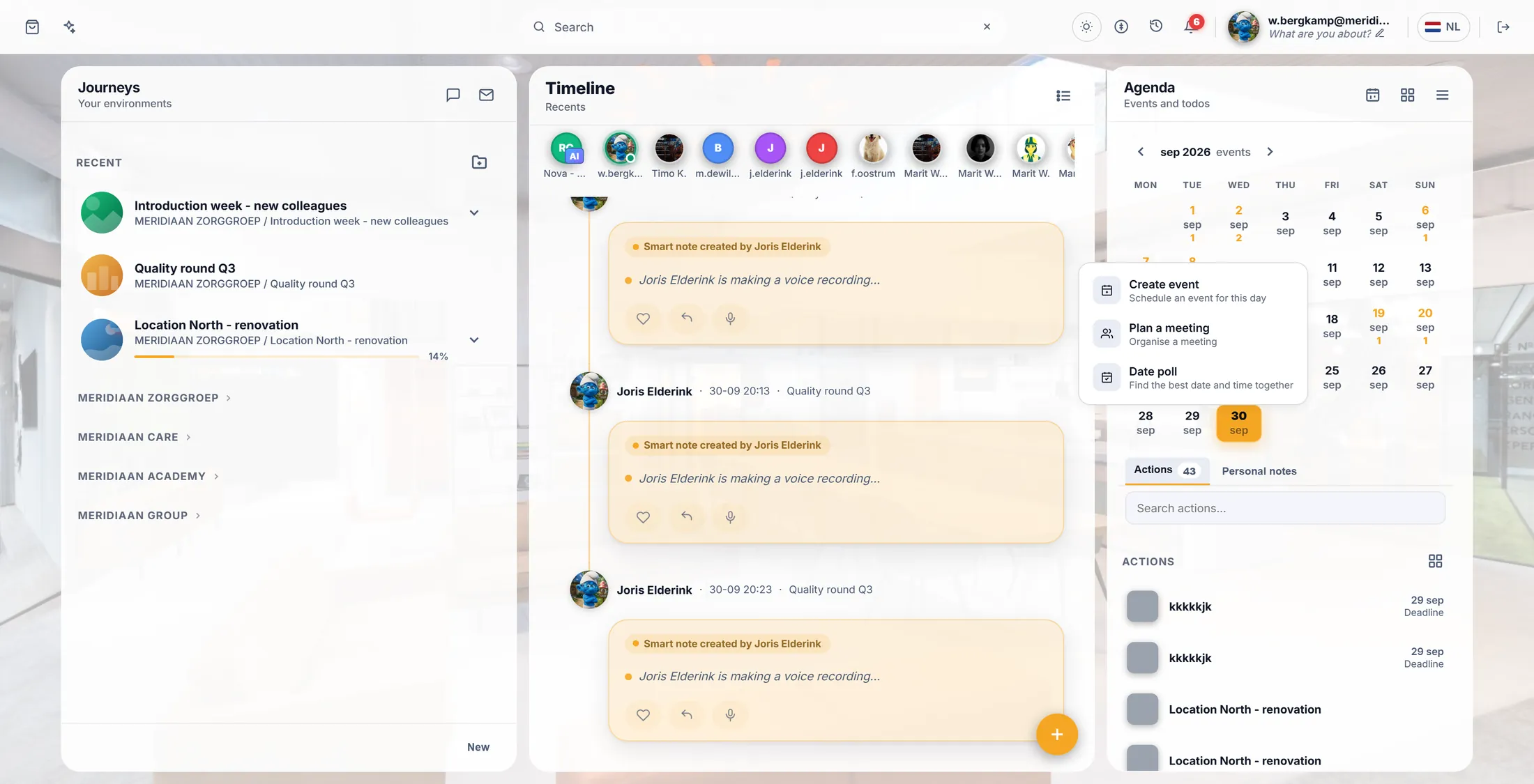
Click a day, then Plan a meeting. Choose the kind of meeting
Video with login, video for anyone, or in a room.
- Secured video meeting : only people who log in to CoVince can join. The usual choice.
- Open video meeting : anyone with the link can join, no login. Good for guests.
- Physical meeting : in a room. You get an extra step for the place.
- Press a card, then Next →. The top right says how far you are: Step 1/4 .
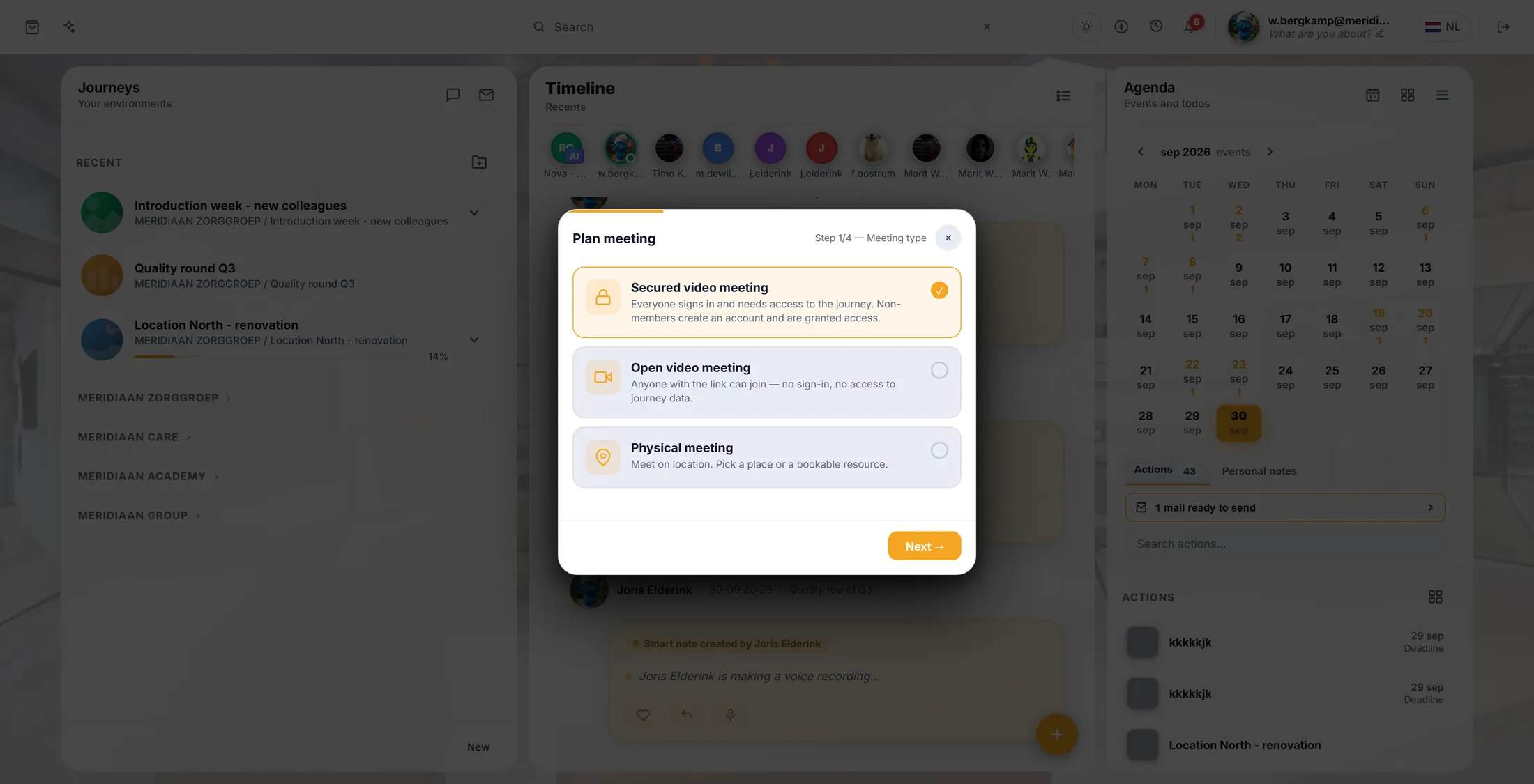
Three kinds of meeting. Pick the journey
Only asked when no journey was chosen yet.
- The screen asks In which journey? - a journey is what CoVince calls a journey.
- Type a few letters in Search journeys... and click yours, for example Introduction week - new colleagues .
- No journey for it yet? Press + Create journey, give it a name, and carry on.
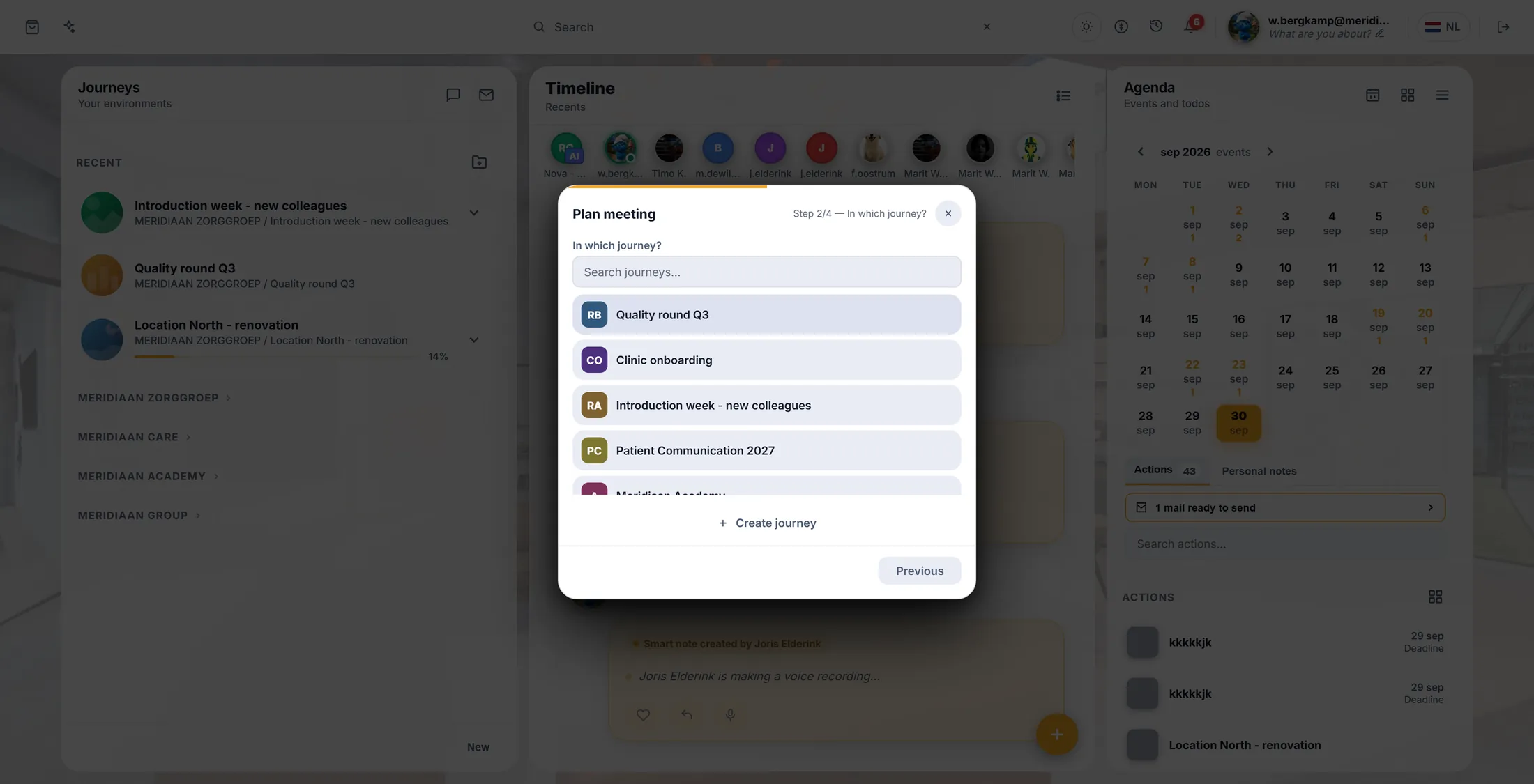
Pick the journey the meeting is about. Title, day and time
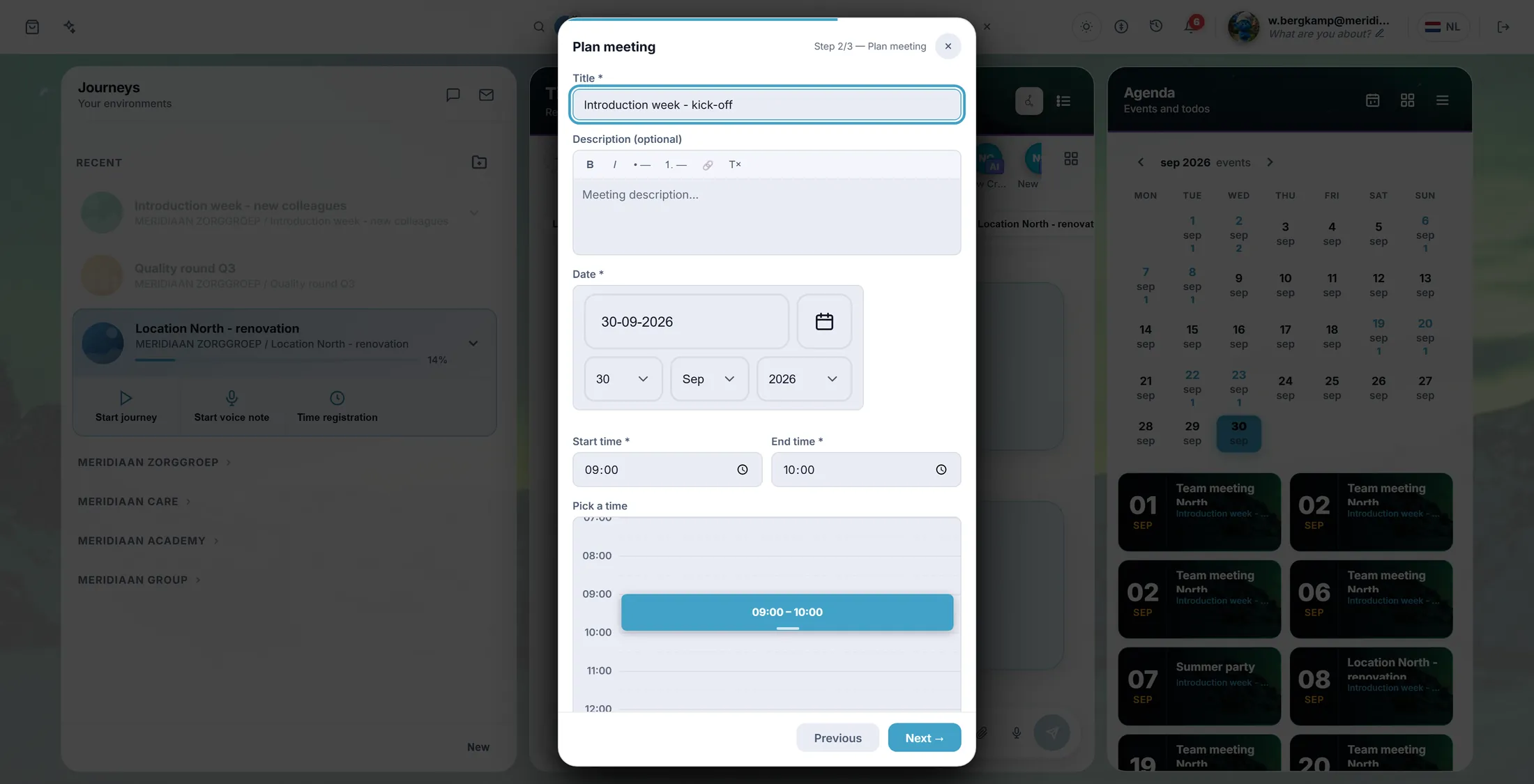
Give it a name, a day and a time. The grid shows who is busy.
- Title : for example Introduction week - kick-off .
- Date , Start time , End time . It starts at 09:00 - 10:00; change it.
- Look at Pick a time : grey blocks are people who are busy then. Click a free spot in the grid to take that time.
- Video meeting? Press Use journey videocall: the link goes into Location by itself.
- Press Next →.
Grey blocks: someone is busy then. Tick the people
Tick who comes. People outside CoVince can be added with their mail address.
- At the top you see the time you chose. Is someone busy then? Their name is there.
- Under Invite participants , tick the people who should come.
- Someone without CoVince? Type their address at Someone outside CoVince (e-mail) and press Add.
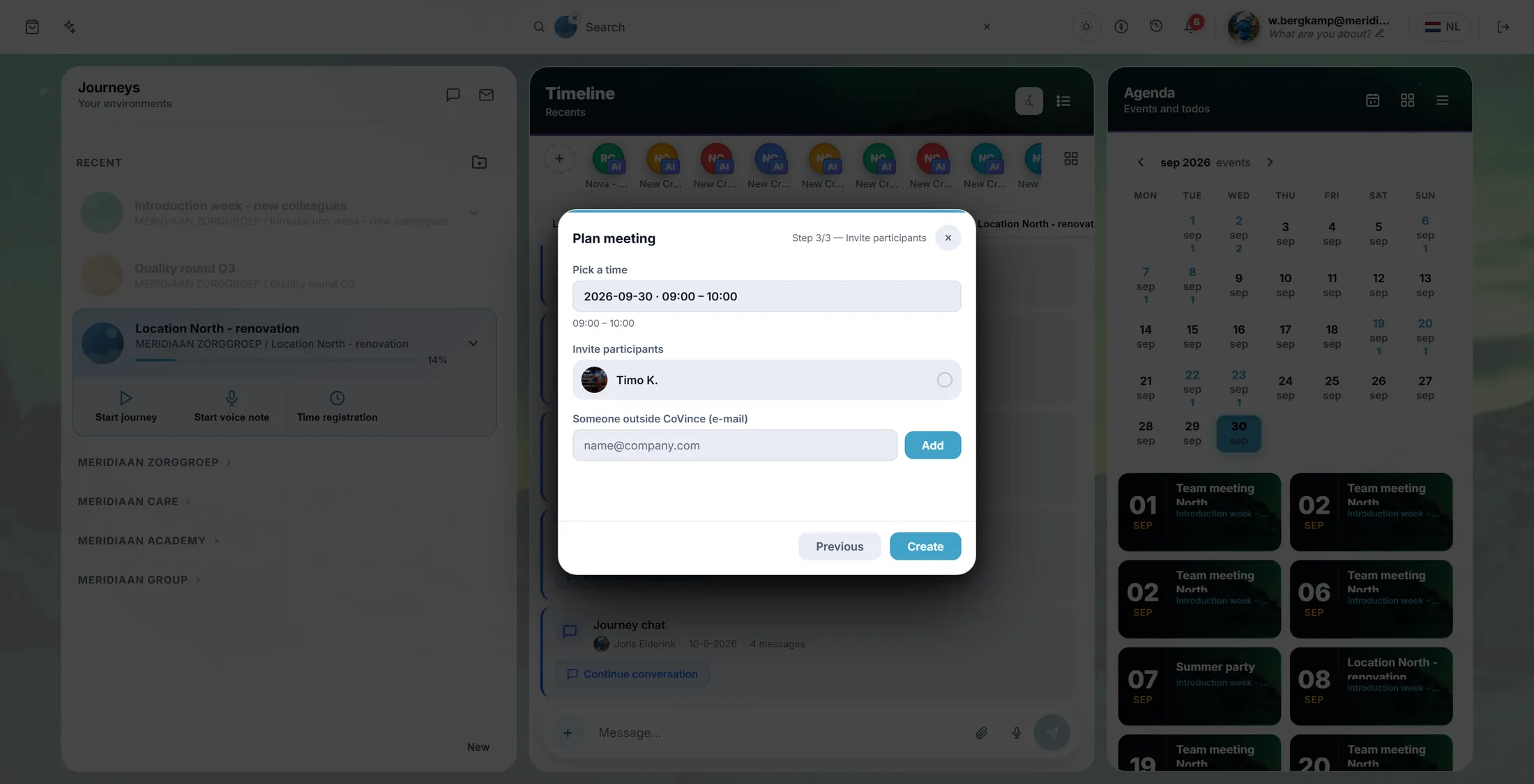
Tick the people. Add guests by mail. Press Create
Now it is saved and everyone gets a mail.
- Press Create. It says Sending... and then Meeting created .
- The window closes. The meeting is in your agenda, with Going on it.
- Everyone you ticked gets a mail with the day, the time, the place and the video link.
- Guests from outside get Meeting invitation with a calendar file: one click and it is in their own calendar.
Join the meeting
When it is time, click the meeting and press Open meeting.
- Click the meeting in your agenda.
- Press Open meeting. In the week agenda it is called Join meeting.
- The call opens inside CoVince.
- Guests with an open meeting see Join video call : they type their name and mail and press Join call.
If something is not right
The person I want is not in the list.
They are not in the journey yet. Add them first, or type their mail at "Someone outside CoVince".
Create gives an error.
Check the title, the day and the times. Those three are needed.
There is no Open meeting button.
The meeting has no video link. Plan it again with Use journey videocall.
Can I plan from a mail?
Yes. In your mail, pick the mails and press Plan meeting from mail.
The words, in plain language
- journey
- What CoVince calls a journey: one goal, with its people, files and plans.
- busy block
- A grey block in the grid: that person has something else at that time.
- open video meeting
- A call anyone with the link can join, without an account.
Where to go next
- All explainers The other things you can learn here.